Digital Archaeology: How the LTK works
This is the middle part of the LTK story. The first part is from 2018: a bin of broken hardware and the start of getting it running again. The last part is DOS 8, the new DOS that takes the wall down. This one's the background you'd want before reading that: what's in the box, how it boots, how Xetec kept you from copying it, how the DOS sits on the drive, and why you couldn't use more than about 160 MB of a drive.
A whole lot of what's known about the LTK comes from David A. Gardner, who went by ebay94bravo, and his Lt. Kernal pages, which Cameron Kaiser still hosts on Floodgap. I lean on three of his pages here: the host adapter details, the DOS commands and the Wall. Where the source code we've rebuilt since adds something, I've filled it in.
What's in the box
The LTK is a host adapter that plugs into the expansion port, and a SCSI drive in its own case. The drive's nothing special. Xetec just rearranged the pins on the 25-pin connector so you couldn't use a cheaper SCSI case.
The host adapter is where everything happens:
- A PIA, the MC68B21. It's the bridge between the Commodore's bus and the SCSI bus, two 8-bit ports that the DOS flips between input and output. The "B" part is the 2 MHz version, which the C128 needs. On a C64, any of the 6821 family will do.
- Two PLDs. Intel 5C032s that map the adapter's RAM in and out of the computer's memory. Xetec set the security bit when they programmed them, to keep anybody from reading them back. Gardner's page points out that the logic is combinatorial, so you can work out the truth table anyway.
- An 8K EPROM, a 2764. The boot code. The first half's for the C64 and the second half's for the C128.
- 16K of RAM, two 8K chips Gardner calls shadow RAM. The DOS lives there and not in the computer's own memory, because earlier versions that loaded the DOS under the Kernal ROM kept running into other software. Once it's booted, the upper 8K holds a patched copy of the Kernal and the lower 8K holds the resident DOS and two 512-byte buffers.
That last part's a big deal. The DOS doesn't take any of the C64's own RAM, so your programs get the same memory they'd have without it, and the DOS stays out of the way until a Kernal call needs it.
Booting up
The EPROM looks like any other cartridge to the C64: it's got CBM80 at $8004, so the Kernal jumps into it at power-on. From there, as best we've been able to work it out from the source:
1. The cartridge start copies a small boot stub to $cd00 and runs it.
2. The stub finds the adapter (at $df00, or $de00), resets the SCSI bus,
   and waits for SCSI ID 0 to answer.
3. It reads block 0 of the drive, the "system track", and checks it starts
   with "SYSTEMTRACK".
4. It compares the serial number in the EPROM with the one on the drive.
   If they don't match, the border flashes forever.
5. It loads the second-stage boot and jumps to it.
6. That copies the Kernal ROM into the adapter's upper 8K, patches it,
   loads the resident DOS into the lower 8K at $8000, and resets the C64.
7. The C64 comes up on the patched Kernal. The first Kernal call that
   needs the DOS brings it in, and initc064 finishes the start.
If there's no drive, or no DOS on it, the stub gives up and you get a plain C64 with the floppy as device 8. That's how a fresh install works: boot without a DOS, then run SYSGEN from the floppy.
Here's a fun one we tripped over: every byte on the drive is stored inverted. The SCSI data bus is active-low, and the LTK copies data straight through the PIA without flipping it, so a raw image of an LTK drive shows "SYSTEMTRACK" as ac a6 ac ab .... Only the command bytes get inverted in software. If you ever dd an LTK drive on a PC, XOR every byte with $ff before you go looking for anything.
The copy protection
Every LTK was keyed. Your host adapter's EPROM had a serial number in it, and your SYSGEN disks were made for that serial. The DOS checks it in a bunch of places:
- The key sector. Track 18, sector 18 of the SYSGEN disk holds the serial number, the geometry of each drive on the system, and the checksum the installed DOS should come out to. That's what made a SYSGEN disk yours.
- SYSGEN. Setup compares the key's serial with the one on the drive. If they don't match, it asks, and if you go ahead anyway it throws out your LU table and port settings.
- The boot ROM. Step 4 above. The serial at
+$1f4of the system track has to match the EPROM's, or the machine sits there flashing the border. - The DOS, again. initc064 and initc128 compare the serials one more time once the DOS is up, and print a message from LU 10 if they're different.
- The DOS checksum. At the end of a SYSGEN, and any time you run CHECKSUM, the DOS adds up its own blocks on LU 10, six bytes worth of three different sums, and compares them with the value from the key sector. Patch a byte of the DOS and the sum's wrong.
- The minisub checksums. Each of the one-block routines at the start of LU 10 has a last byte that makes the whole block add up to its own block number. The DOS checks them at boot and resets the machine if one's off.
- A hidden copyright line. One of those blocks,
scramidn.r, encodes Fiscal Information's copyright notice when it's installed, and the overlays can show it.
The DOS also guards its own area. The disk driver refuses to write to LU 10 blocks $11 to $ed unless the call is followed by three magic bytes, $b2 $c2 $d2, so a stray write from a program can't scribble on the DOS.
None of that's going to stop a determined person, and over the years people got around all of it. It does mean a drive SYSGENed on one adapter won't boot on another, and that's a real pain when you're trying to save old hardware today. (DOS 8 takes all of it out. More on that in the last part.)
How the DOS is put together
The resident DOS in the adapter's RAM is only 7 blocks, 3.5K. Everything else gets loaded from LU 10 when it's needed, in three sizes:
- Minisubs are one block each and run at
$93e0: find a file, load it, allocate blocks, free them, draw the status line. - Overlays are up to three blocks and run at
$95e0: OPEN, CLOSE, SAVE, the command channel, the keyed index file modules. - Commands are ordinary files in LU 10's directory, the ones you type:
dir,copy,validateand so on. The small ones run in the adapter's RAM too, and the bigger ones load at$c000.
Here's where all of that sits on LU 10:
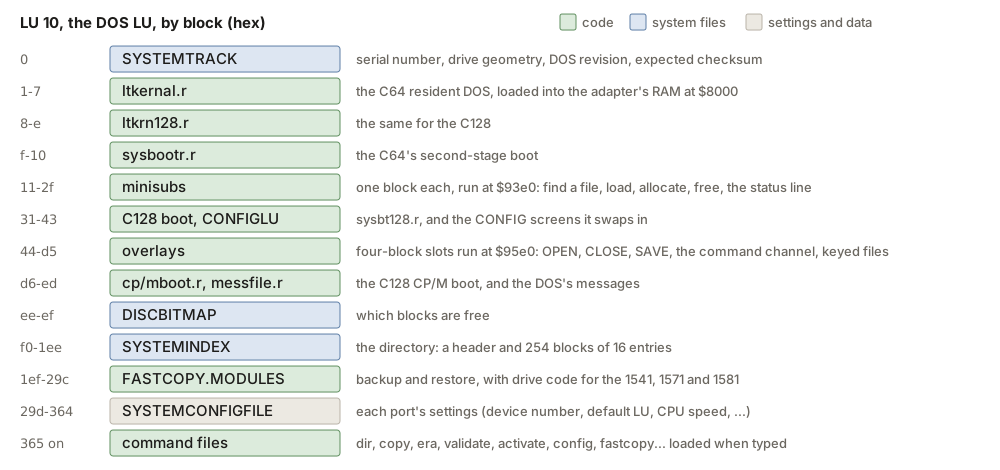
That's also why the LTK feels quick. A command's a file on a hard drive that's 100 times faster than a 1541, so loading a piece of the DOS doesn't cost much.
LUs
The LTK splits its storage into logical units, LUs. Each one is its own little disk with its own directory and free-space map, and it's a run of whole cylinders on one of the drives. LU 10 is the DOS, and it always starts at cylinder 0 of SCSI ID 0. You get ten more for your own stuff, 0 through 9, and you can put them on any drive. Each one can also have 16 user areas, which work a lot like CP/M's user numbers.
The LU table that says where each one lives is 50 bytes, ten entries of 5 bytes, in RAM at $80a8 and in a block on LU 10:
byte 0  bit 7     CP/M LU
        bits 6-5  SCSI LUN
        bits 4-2  SCSI ID
        bits 1-0  start cylinder, high bits
byte 1            start cylinder, low byte
byte 2  bits 7-4  heads
        bit 3     a DOS image is on this LU
        bits 2-0  number of cylinders, high bits
byte 3            number of cylinders, low byte
byte 4            sectors per track
Remember that table. Pretty much every limit in the next section comes out of it.
Inside a user LU, the first part of the LU is the bitmap, then the index, then (if you asked for one) a copy of the DOS, then your files:
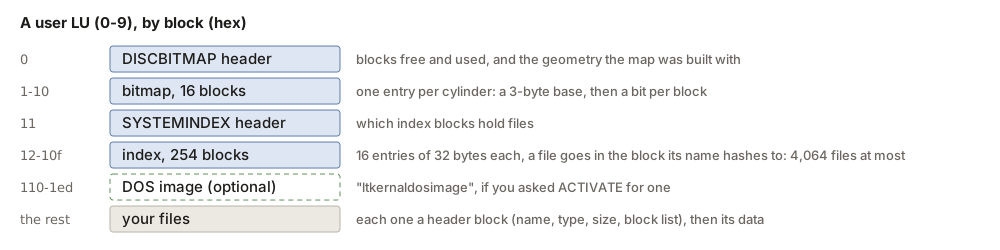
The index is a hash table. A file's name picks one of the 254 index blocks, and each block holds 16 entries, so an LU can hold 4,064 files at most. Gardner's page puts the limit at about 4,000, which fits.
An LU can also hold its own copy of the DOS. ACTIVATE will put one there if you ask, and then the DOS loads its pieces from that LU while you're on it. The first boot after a SYSGEN refreshes every copy (that's autoupdt.r's job).
The commands
You type LTK commands in lowercase at the far left of the screen, right in BASIC's direct mode. The one-letter ones just do something (d 9 moves the LTK to device 9), and the word ones usually bring up a menu. The ones you'll use the most:
dir            list the directory, with a whole lot of options
l name         load a file          s name      save one
lu 1           change LU            user 2      change user area
lg             LU, user, blocks free and used, on the error channel
era name       erase a file         oops        bring back the last one erased
copy           copy files           autocopy / automove / autodel
fastcopy       back up to and restore from a 1541, 1571 or 1581
dir is the one that's got the most to it. Gardner calls it "DIR on steroids". It takes a pattern and a pile of letter switches after a colon, and you can mix them:
dir                 this LU, this user
dir 1:2 sys         LU 1, user 2, names starting with "sys"
dir :a              every user on this LU
dir :g              every LU (global)
dir :s              sorted          dir :p    to the printer
dir :c              only files changed since the last backup
And then there are the ones you run once in a while and want to be careful with:
- CONFIG sets up the LUs (CONFIGLU) and each port's settings: device number, default LU, CPU speed on a C128, and so on.
- ACTIVATE makes a fresh, empty LU: a new bitmap and a new index. Anything that was there is gone.
- VALIDATE rebuilds an LU's bitmap from the files in its index, and checks each index entry against its file's header along the way.
- RECOVER goes the other way. It reads every block on the LU looking for file headers, builds a new index from what it finds, and then runs VALIDATE.
- OOPS brings back the last file you erased on an LU, as
oopsfile1. - CHECKSUM checks the DOS on LU 10 against the key's checksum.
- DIAG reads and writes blocks on an LU to test the drive.
- LKOFF takes the LTK offline, so you've got a plain C64 again. LKREV shows the DOS version and serial number.
- I.C.Q.U.B., on the second SYSGEN disk, is a snapshot utility. Push the button on the adapter and it saves the whole running machine, all 64K plus the chips' registers, to a file on the LTK, and it can put it back and pick up where it left off.
There's a bunch more (renum, merge, dump, type, query, build for relative files). Gardner's DOS commands page has the list, and the manual has all of it.
The wall
If you only ever used small drives with your LTK, you never ran into this one. If you put a bigger drive on it, you found out pretty quick that the DOS can't use much past about 160 MB of it, no matter how big the drive is. Gardner called it the Wall.
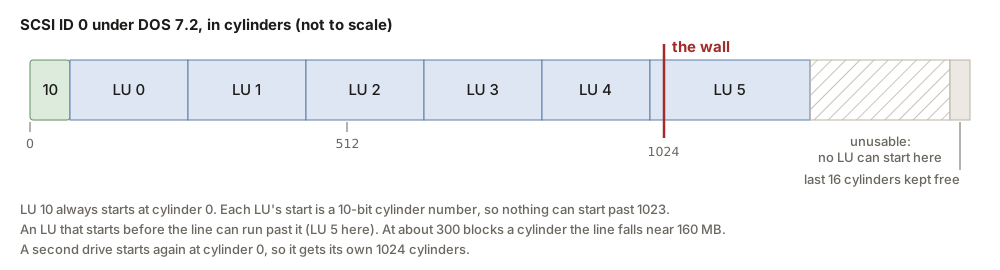
The reason's right there in the LU table: an LU's start is 10 bits of cylinder number. No LU can start past cylinder 1023, and CONFIG won't let you try. At about 300 blocks a cylinder, which was pretty typical for drives back then, that's 1024 x 300 x 512 bytes, or about 160 MB. The last LU that starts before the line can run on past it, but nothing can start out there.
Gardner's page walks through it with a real system. Make the LUs 267 cylinders each on a 7-head, 35-sector drive and the fifth one won't go in, because it would start past 1024. Shrink the earlier LUs so the next one starts just under the line, and you can squeeze one more in, and then you're stuck. His ways around it:
- Add another drive. Every drive starts again at cylinder 0, so each one gets its own 1024 cylinders. His tested example used two drives to get 290 MB.
- Use a drive with more heads and sectors. More blocks per cylinder means the same 1024 cylinders reach further.
Except the second one runs into the next wall, and he found that out too. Push the heads past 15 or the sectors per track up high and the index and bitmap get eaten, and new files land right on top of old ones. He had to de-tune a 2 GB drive way down, to 1,200 cylinders, 15 heads and 34 sectors, just to get it to install and pass CHECKSUM, and even then he could only put 153 MB of it in LUs.
With the source in hand, it turns out the wall's really a bunch of limits stacked on top of each other:
- The heads field is 4 bits. Look at byte 2 of the LU table. Fifteen heads is all it can hold.
- The bitmap's a fixed size. Every LU's bitmap is 17 blocks, a header and 16 map blocks, because the index header is hard-wired at block
$11right after it. The map is stored per cylinder, a 3-byte base plus a bit per block, so a map block holds512 / (3 + ceil(blocks_per_cylinder / 8))cylinders, and nothing ever checks that the map fits. With 233 to 248 blocks a cylinder that's 15 cylinders a block, and 16 blocks cover exactly 240 cylinders. Make the LU bigger and ACTIVATE and VALIDATE write map blocks right over the index header. That's the "VALIDATE destroys the bitmap past 240 cylinders" problem people reported, and it's likely what ate the index on Gardner's big drive. No geometry fits much more than about 29 MB in that layout. - The driver's math. The disk driver works out a block address as start cylinder x heads x sectors, plus the block, and its first multiply drops a byte, so start x heads has to stay under 65,536.
- The SCSI command. The LTK sends READ(6) and WRITE(6), which only carry a 21-bit block address. Past 2^21 blocks, 1 GB, the address would run over into the LUN bits.
- The counters. The bitmap's free and used counts are 24 bits, but most of the allocators only carry the low 16. A cylinder count with a zero low byte (256, 512, 768) breaks VALIDATE and ACTIVATE too.
- Ten LUs. Even with everything else right, ten user LUs of at most 65,536 blocks is about 330 MB. Gardner called that the last wall, "beyond which, you can't go unless you want to rewrite SYSGEN!"
He also pointed out a sneaky trick: since moving an LU's start doesn't touch the data, you could keep several "shadow" LUs on a big drive and switch between them by changing the LU table, for about 1.1 GB in all. Just make sure you write down your settings.
Anyway, that's the LTK as it shipped. The last part is what it took to rewrite SYSGEN.